3-D Covers for E-Books and Boxes by An Unknown Talents Production - HTML preview
PLEASE NOTE: This is an HTML preview only and some elements such as links or page numbers may be incorrect.
Download the book in PDF, ePub, Kindle for a complete version.
Download the book in PDF, ePub, Kindle for a complete version.
25
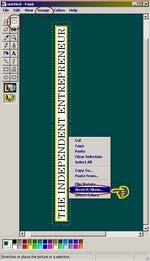
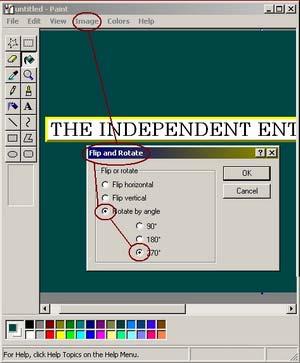
Now that we have our title, let’s put it on the book spine (or left side for the box). First we need to orient it standing up. Choose the IMAGE button, then ROTATE BY ANGLE and click the 370 degrees radio button.
Once you’ve hit the OK button, we can add the depth to fit on the spine. You need to select the entire title, Click on IMAGE then on STRECH AND SKEW.