

Cubase vst-the MIDI Mixer and Mix Tracks by - HTML preview
PLEASE NOTE: This is an HTML preview only and some elements such as links or page numbers may be incorrect.
Download the book in PDF, ePub, Kindle for a complete version.
Download the book in PDF, ePub, Kindle for a complete version.
Opening the Mixer Window
Opening a loaded Map
1. Set up the Mixer Track to use the desired Map as described above.
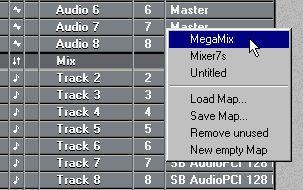
Setting a Track to use a loaded map.
2. Create at least one Part on the Track.
The Mixer window with the map appears.
Opening an empty Map
1. Open the Mixer Map pop-up menu from the Track Output or the Inspector.
2. Select “New empty Map”.
3. Create at least one Part on the Track.
4. Double click on the Part.
The Mixer window with the empty map appears. You can now create Objects, rename the map and save it to disk.