

Cubase vst-the MIDI Mixer and Mix Tracks by - HTML preview
PLEASE NOTE: This is an HTML preview only and some elements such as links or page numbers may be incorrect.
Download the book in PDF, ePub, Kindle for a complete version.
Download the book in PDF, ePub, Kindle for a complete version.
Saving and Naming Mixer Maps
Naming a Mixer Map
There are two ways to name the Mixer Map:
• In the Mix Track Output column.
• In the Inspector.
1. Double click on the existing name in the list.
A text box appears.
2. Write in the new name.
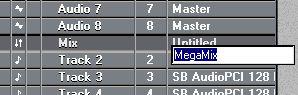 Naming a Mixer Map.
Saving one Mixer Map to Disk
1. Open the Mixer Map pop-up menu from the Track Output or the Inspector.
2. Select a map in the list.
3. Open the pop-up again and select “Save Map...”.
4. Use the File dialog to specify name and location for the map.
5. Click Save.