

Cubase vst- Getting into the Details by - HTML preview
PLEASE NOTE: This is an HTML preview only and some elements such as links or page numbers may be incorrect.
Download the book in PDF, ePub, Kindle for a complete version.
Download the book in PDF, ePub, Kindle for a complete version.
The Window Sections
The central display in the Graphic editor is divided into six sections. Some of these can be hidden using the group of buttons on the Function bar.
 Here are the graphic editor’s areas, from top to bottom:


Info Line (turned
on/off using the
Info button).
Time Signature Strip
(turned on/off using
the Time Sig button).
Meter Hitpoint Strip
(turned on/off using the
Hitpoint button).
Time Hitpoint Strip
(turned on/off using the
Hitpoint button).
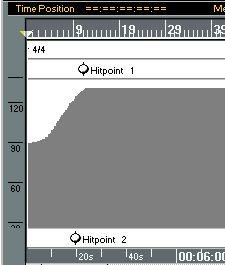 Time Ruler (turned on/off using the Time button).