

Cubase vst- Getting into the Details by - HTML preview
PLEASE NOTE: This is an HTML preview only and some elements such as links or page numbers may be incorrect.
Download the book in PDF, ePub, Kindle for a complete version.
Download the book in PDF, ePub, Kindle for a complete version.
The Master Track What is the Master Track?
Cubase VST has a Master Track, a special “hidden” Track that contains all the tempo and time signature changes. There is one Master Track for each Arrangement. The Master Track does not have Parts, you always edit the entire length of the Song.
P For the tempo changes to have any affect on the Arrangement whatsoever, you must have the Master button on the Transport Bar activated! The Time Signatures in the Master Track, however, are always used.
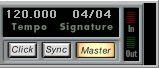 The Master button
 on the Transport Bar.
There are three ways to change the Master Track:
• By editing in the Master Track Graphic editor (see page 559 in this chapter).
• By editing in the Master Track List editor (see page 566 in this chapter).
• By recording tempo changes (see page 554 in this chapter).