

Cubase VST-Score Printing and Layout by - HTML preview
Download the book in PDF, ePub, Kindle for a complete version.
Chord Tracks and Accidentals
There’s a special Track Class in the Arrange window called Chord Tracks. These are used with StyleTrax, but also come to good use with accidentals in Score Edit.Often when creating a score, you spend a lot of time manually adjusting enharmonic shifting. By Chord Tracks, enharmonic shifting will be automatic, saving you hours of work!
Creating a Chord Track1. Create a Chord Track.
This is done by creating a Track and switching it’s Class to “Chord Track”, using the Track Class pop-up in the Track List.
2. Open this new Track and the MIDI Tracks that contains the chords, in the Score Editor.
3. Click in the Chord Track to make it the destination for the Chord Symbols.
The chord symbols appear on the Chord Track.
5. If needed, edit the automatically created Chords.
P Chord Tracks do not handle enharmonic shifting in chords as well as regular MIDI Tracks do. Sometimes for example a bass note maybe be indicated with the wrong enharmonic shifting.
Applying the Chord Track to the ScoreAs described above, the whole purpose of creating the Chord Track with the Scale events is to make the program automatically apply enharmonic shift according to the current chord/scale at every position in the song.
1. Make sure the Chord Track is the only un-muted Chord Track in theArrangement.
2. Open the Preferences–Scores–Accidentals dialog.
3. Activate the “Use Chord Track For Accidentals” option.
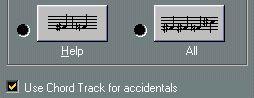 The Use Chord Track for Accidentals option in “Global Settings: Accidentals”.
4. Select an accidental display option.
The Use Chord Track for Accidentals option in “Global Settings: Accidentals”.
4. Select an accidental display option.
The options are described in detail on page 154.
Now, the notes in the score will have correct accidentals. There might be situation where you will need to apply “manual override” as described on page 155, but such situations should be very rare!
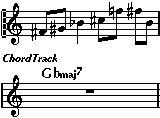 “Use Chord Track For Accidentals” turned off.
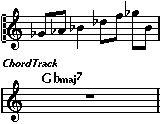 “Use Chord Track For Accidentals” turned on.
P You don’t have to have the Chord Track visible in the Score for this function to apply!