

Cubase VST-Score Printing and Layout by - HTML preview
PLEASE NOTE: This is an HTML preview only and some elements such as links or page numbers may be incorrect.
Download the book in PDF, ePub, Kindle for a complete version.
Download the book in PDF, ePub, Kindle for a complete version.
Creating a Lead Sheet
Below follows a quick description of how to create a Lead sheet. Use it as an inspiration source!1. Make up one Track into which you record the chords for the song.
There should be one chord at each place you want a chord in the song.
2. Quantize the Part as “heavily” as you can.
3. Create an empty Part with the same length, on another Track.
4. Open both Parts together in Score Edit.
5. Make the empty Part the active Staff and use Make chords.
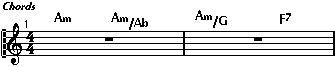
The empty Part with chord symbols only.
6. Close Score Edit.
7. Create another Track and record the melody on this.
8. Format this Track in Score Edit, add lyrics etc.
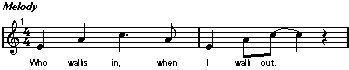
The melody Track.
9. Close the Score Editor again.
10.Merge the chord and melody Tracks by holding down [Ctrl] and [Alt] and dragging the Part(s) on one Track onto the other Track.
Make sure not to offset the parts time-wise.
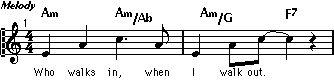 The final lead sheet.