

The Definitive Guide to Protecting Kids Online by Jack Hughes - HTML preview
Download the book in PDF, ePub, Kindle for a complete version.
Chapter 3: Multi Layered Protection: Wi-Fi
Cellular & Third-Party Apps
Why One Layer Is Never Enough
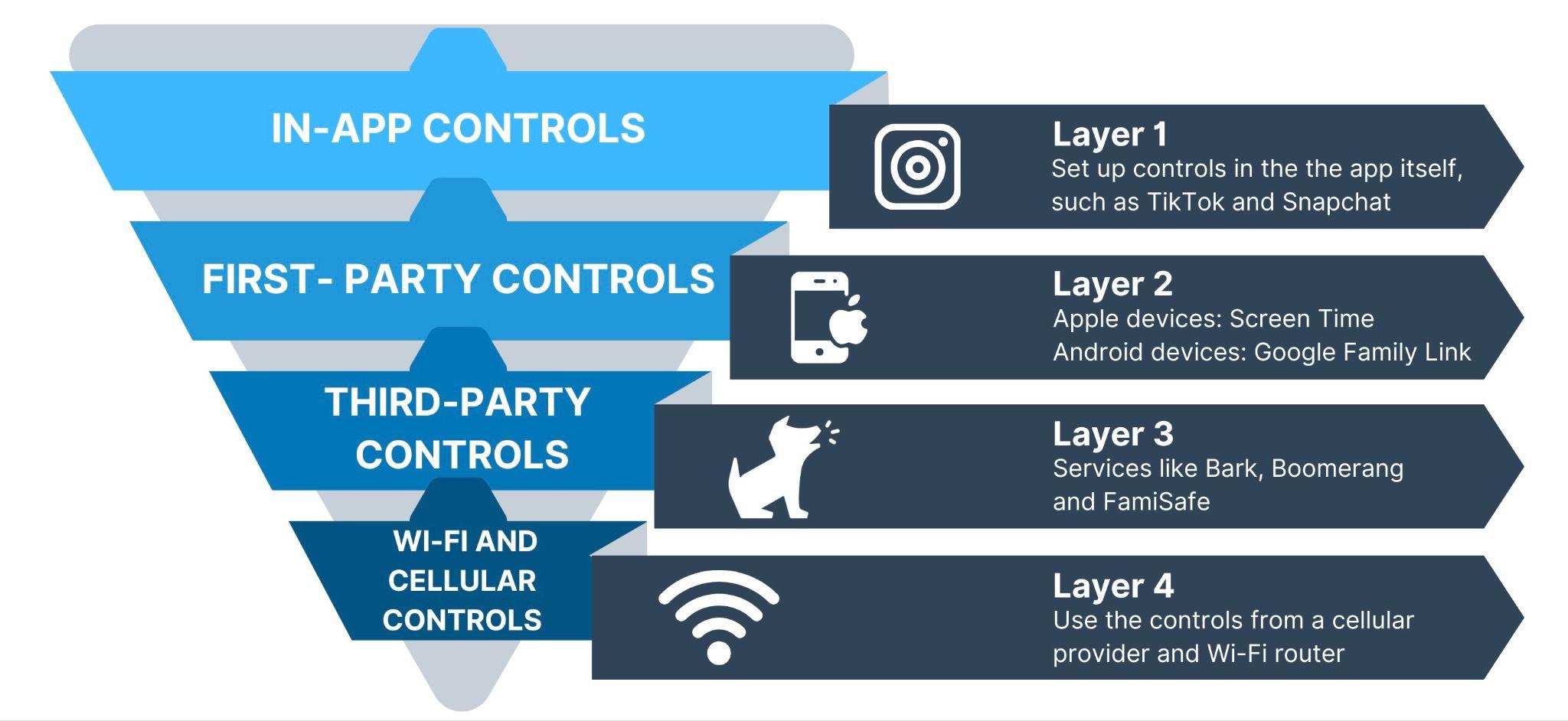
When it comes to protecting children in the digital age, relying on a single line of defense is inadequate. A multi-layered approach is essential to minimize vulnerabilities and stay ahead of evolving challenges. Comparing online safety to a diamond locked inside a vault, multiple security measures—each addressing specific risks—work together to create a comprehensive protection strategy. Let’s explore why a multi-layered approach is crucial and how to implement it effectively.
The Diamond-in-the-Vault Analogy
Imagine that your child’s online safety is like a priceless diamond stored in a high-security vault. The diamond represents your child’s well-being and digital integrity, while the vault symbolizes the measures you put in place to protect it. If the vault has only one lock, it’s easier for someone to break in. But when multiple layers of security are added—an outer gate, surveillance cameras, biometric scanners, and multiple locks—breaching the vault becomes exponentially more difficult. Similarly, stacking parental controls, router settings, and device restrictions ensures that gaps in one area are covered by another.
Single-layer solutions, such as basic device-level parental controls, often fall short because they are relatively easy for tech-savvy kids to bypass. For example, children might use alternative browsers, exploit app permissions, or reset device settings to circumvent restrictions. Real-life examples highlight the importance of layered protection. In one case, a child exploited their device’s notification settings to interact with social media despite app-level time limits. In another, a young teen used a virtual private network (VPN) to access blocked websites. These workarounds underscore the need for comprehensive safeguards that address potential loopholes.
Router-Level Parental Controls
The first layer of a multi-layered strategy begins at the source of your home’s internet: the router. Router-level parental controls are foundational because they apply restrictions to all devices connected to your network, regardless of their individual settings. Devices like Google Nest, Eero, and Gryphon routers are user-friendly options that offer parental controls as part of their features. These tools allow parents to filter websites, monitor activity, and enforce time-based restrictions.
For instance, setting up domain filters ensures that specific categories of websites—such as those containing adult content—are inaccessible from any device in the household. Timed access features are equally valuable, allowing parents to designate internet-free periods during homework time or bedtime. This removes the temptation to use devices when focus or rest should be prioritized.
Another powerful tool is OpenDNS, which provides additional security by filtering content at the network level. OpenDNS works by intercepting and redirecting traffic from restricted sites, adding another checkpoint to prevent unauthorized access. Implementing OpenDNS in conjunction with router-level controls significantly reduces the chances of children encountering inappropriate content.
Cellular Network Safeguards
While router-level controls are effective at home, cellular network safeguards address on-the-go vulnerabilities. Major providers like Verizon, AT&T, T-Mobile, and Sprint offer parental control services tailored to mobile devices. These services allow parents to monitor usage, block inappropriate content, and set data usage caps. By restricting access to specific websites and apps, cellular controls ensure that children’s devices remain secure even when they’re outside the home Wi-Fi network.
For example, data usage caps can prevent excessive screen time during school hours. Additionally, school-time lockdowns can disable non-essential apps, ensuring that children stay focused on their studies. Balancing freedom with safety is key—while it’s important to restrict harmful activities, providing enough flexibility for age-appropriate exploration fosters trust and responsibility.
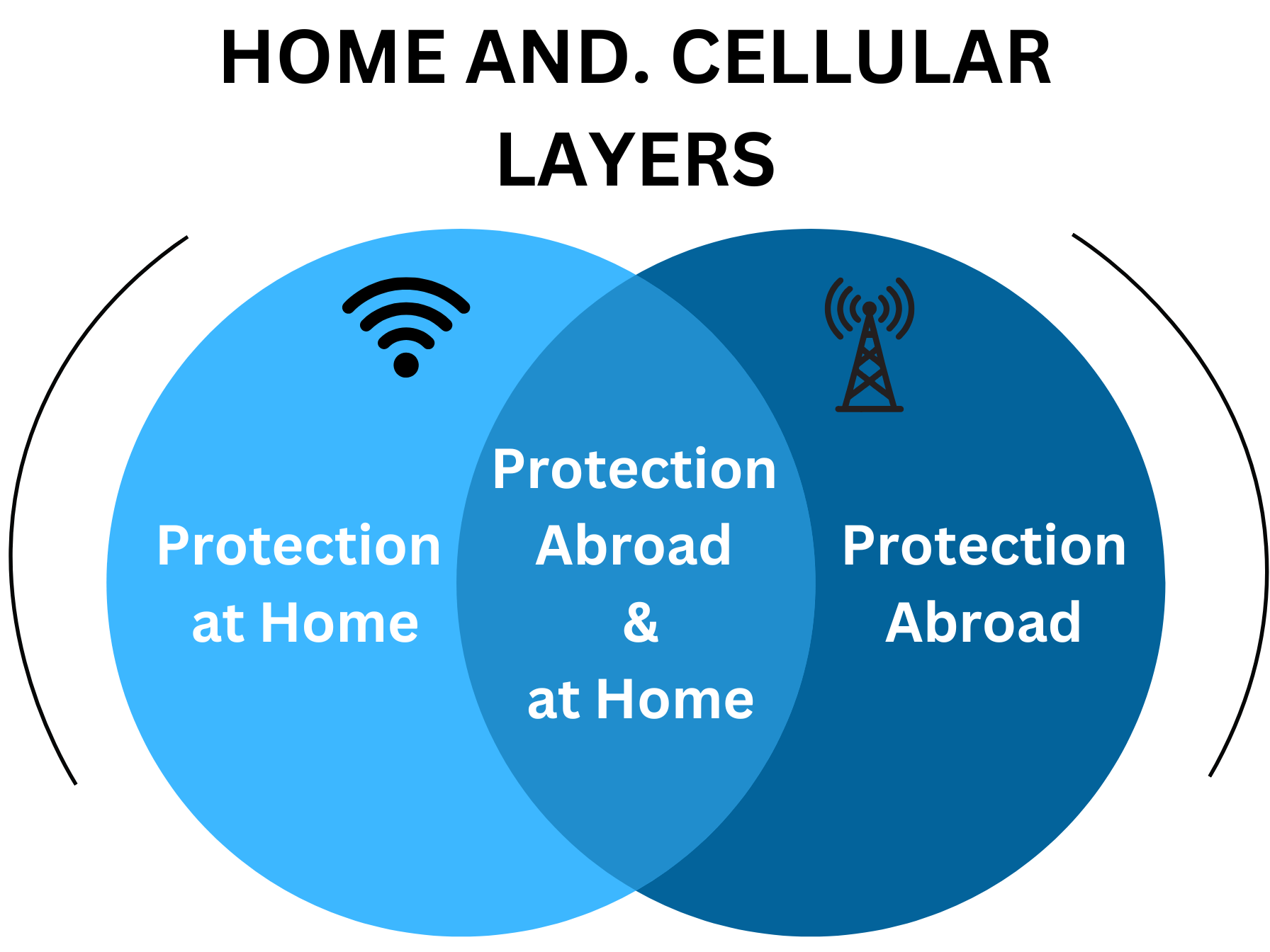
A practical example involves enabling
location tracking through cellular network
services. This feature not only ensures
safety during emergencies but also helps
parents monitor their child’s whereabouts in
real time. Open communication about why
this feature is in place can alleviate
concerns about privacy while emphasizing
its role in promoting safety.
Building a Comprehensive Strategy
The effectiveness of multi-layered protection lies in the interplay between different tools and techniques. For instance, combining router-level controls with device-based restrictions ensures that even if one layer is compromised, others remain intact. This redundancy is crucial in addressing the diverse tactics children might use to bypass restrictions.
Regular audits of all layers are essential to maintaining their effectiveness. Check router settings periodically to ensure filters and time restrictions are active. Review cellular data usage reports for unusual activity, which might indicate attempts to circumvent controls. Keep an eye on app installations and permissions, as some third-party apps might facilitate workarounds.
Ultimately, a multi-layered approach is not just about technology but also about fostering a culture of accountability and communication. Encourage your child to share their online experiences and concerns, reinforcing the idea that parental controls are tools for protection rather than punishment. Involve them in setting boundaries and discuss the reasons behind specific restrictions. This collaboration helps build trust and reduces the likelihood of secrecy or defiance.
As technology continues to evolve, so do the methods for bypassing restrictions. Staying informed about new tools, trends, and potential vulnerabilities is critical for adapting your strategy. By implementing a multi-layered approach, you can create a digital environment that prioritizes safety without stifling growth and exploration.
Third-Party Parental Control Services
When it comes to protecting children online, third-party parental control services are a critical component of a multi-layered strategy. While built-in tools provide foundational controls, external applications often fill gaps by offering advanced features and monitoring capabilities. By integrating these services into your overall approach, you can bolster your child’s online safety without relying solely on device-level or network-level solutions.
Overview of Key Players
One of the most prominent names in third-party parental control services is Bark. Known for its ability to monitor texts, photos, and social media activity, Bark’s strengths lie in its comprehensive alerts for inappropriate content or concerning behavior. Parents are notified of potential issues, such as cyberbullying, explicit language, or indications of depression. This proactive alert system allows parents to address concerns without micromanaging every interaction. However, Bark’s weaknesses include a reliance on access permissions that can be revoked by tech-savvy children. Additionally, its effectiveness varies depending on the social media platforms your child uses, as some apps provide limited integration.
For families seeking detailed feature comparisons, services like Famisafe and Net Nanny stand out. Famisafe offers geofencing capabilities, allowing parents to set location boundaries and receive alerts if their child leaves designated areas. Its app blocking and screen time features complement these location controls, creating a well-rounded safety net. Net Nanny, on the other hand, excels in web filtering and real-time content monitoring, offering an intuitive dashboard for parents to manage restrictions. While both are effective, their differences highlight the importance of aligning features with your specific needs—whether that’s location tracking or robust content filtering.
Boomerang and Qustodio also provide notable cross-platform capabilities. These services are ideal for families with a mix of Android and iOS devices, ensuring consistent rules regardless of the operating system. Boomerang emphasizes app-specific time limits and scheduling, while Qustodio’s focus on activity reports and social media monitoring makes it a strong choice for comprehensive oversight. Their versatility helps bridge gaps between built-in tools and other parental control layers.
Extra Features and Monitoring
Many third-party parental control services go beyond basic monitoring, offering features that address specific challenges faced by parents of older children. For instance, driving and location tracking tools are invaluable for teenagers who are new drivers. Apps like Life360 integrate seamlessly with parental control systems, providing real-time updates on driving behavior, such as speed, hard braking, and location history. These insights not only promote safety but also open opportunities for conversations about responsible driving.
Cyberbullying and hate speech alerts are another critical feature. As online interactions become increasingly prevalent, the risk of exposure to harmful content rises. Services like Bark and Qustodio excel in detecting flagged keywords or phrases in texts, emails, and social media interactions, enabling parents to intervene early. These tools prioritize mental health by identifying potential red flags that might otherwise go unnoticed.
E-mail and social media scanning tools also play a vital role. By monitoring messages and posts, these features help identify inappropriate or harmful communications without requiring parents to manually review every interaction. For example, if a child receives an email containing explicit language or a suspicious link, the system flags it for parental review. This level of automation reduces the burden on parents while maintaining a high standard of oversight.
Common Issues with Third-Party Apps
While third-party parental control services offer significant benefits, they are not without challenges. One common issue is bugs, crashes, and battery drain. Many monitoring apps run continuously in the background, which can impact device performance and frustrate children who perceive the app as intrusive. Choosing well-reviewed apps and ensuring compatibility with your child’s device can mitigate some of these concerns.
Compatibility and account syncing are additional hurdles. Families using multiple devices often encounter issues with syncing settings or activity reports across platforms. For example, a restriction set on a parent’s phone might not apply correctly to a child’s tablet, leading to inconsistencies in enforcement. Regularly testing and updating these services is essential to ensure smooth operation.
Another challenge arises when parents attempt to stack third-party services with built-in controls. While layering protections can enhance security, conflicts between systems may arise. For instance, overlapping time limits from different apps can create unintended lockouts or confusion. To address this, parents should establish clear priorities for each layer of protection and test their interactions before implementation.
Building a Holistic Strategy
Integrating third-party parental control services into your family’s digital safety plan requires thoughtful consideration. Begin by assessing your child’s specific needs and the risks they face. For younger children, tools that focus on content filtering and app restrictions may suffice. For teenagers, advanced features like location tracking and social media monitoring become increasingly relevant.
Effective communication is equally important. Discuss with your child why these tools are being used and how they contribute to a safer online experience. Framing parental controls as a partnership rather than a surveillance mechanism fosters trust and encourages responsible digital habits.
Finally, stay informed about updates and new features. As technology evolves, so do the capabilities of parental control services. Regularly reviewing your chosen tools ensures they remain effective and aligned with your family’s needs. By combining third-party apps with other layers of protection, you can create a robust system that adapts to your child’s growth and the ever-changing digital landscape.
Maintaining & Troubleshooting
Effective digital parenting isn’t a set-it-and-forget-it endeavor. Keeping your child safe online requires ongoing maintenance and the ability to troubleshoot issues as they arise. From ensuring apps and subscriptions remain up-to-date to fostering a balanced digital environment, this section explores strategies for maintaining and optimizing your multi-layered protection system.
Continual App Reviews & Renewals
One of the most overlooked aspects of digital safety is the need for regular updates and subscription renewals for parental control apps and services. Technology evolves rapidly, and without consistent updates, even the best tools can become obsolete. Manufacturers often release patches to address vulnerabilities or introduce new features, which can enhance protection. For example, apps like Bark and Qustodio frequently update to stay compatible with social media platforms, ensuring continued monitoring of texts, photos, and activities.
Renewing subscriptions might seem tedious but is crucial for uninterrupted service. Automated reminders can help ensure that services remain active. Additionally, reviewing the features of each app periodically ensures they still align with your family’s needs. As your child grows, their online habits and the risks they encounter may change, making it essential to reassess your tools regularly.
Another critical task is scanning for newly installed VPNs or browsers on your child’s devices. VPNs can bypass most parental controls by masking internet activity, while third-party browsers may not adhere to your preset restrictions. Familiarize yourself with commonly used VPN apps and conduct periodic checks by reviewing installed apps and data usage reports. If you notice unusually low data activity on monitored apps, it could indicate the use of a secondary, unmonitored browser or network.
Lastly, make it a habit to test-drive your child’s device. By navigating their apps, checking their browsing history, and attempting to access restricted content, you can gauge whether your parental controls are functioning as intended. This hands-on approach not only verifies technical efficacy but also offers insight into your child’s online environment.
Balancing Security & User Experience
While robust security measures are essential, they should not come at the expense of usability. Striking a balance between protection and user experience is key to maintaining trust and cooperation with your child.
One common complaint about parental control apps is their impact on device performance. Lag, frequent crashes, or battery drain can frustrate users and potentially lead to resistance from children. To minimize these issues, choose lightweight apps that are well-reviewed for their performance. Regularly update these apps to benefit from improvements that reduce resource usage.
Over-restriction is another pitfall to avoid. While it might be tempting to lock down every aspect of your child’s device, overly stringent controls can breed resentment and encourage workarounds. Instead, involve your child in setting boundaries and explain the reasoning behind each restriction. For instance, you might agree together to limit social media use to an hour a day, fostering a sense of ownership over their digital habits.
As children demonstrate responsibility, gradually easing restrictions can build trust and teach them self-regulation. For example, a teenager who consistently adheres to screen time limits and avoids inappropriate content might earn additional freedoms, such as extended internet access during weekends. This progressive approach not only reduces friction but also prepares them for independent digital life.
When to Seek Extra Help
Despite your best efforts, there may be situations where external assistance is necessary. Professional tech support or coaching can provide valuable guidance in navigating complex parental control setups or addressing persistent challenges. My Service offers personalized advice, helping parents configure tools and parental controls effectively and troubleshoot issues like bypassed restrictions or faulty apps as well as ongoing tech support.
Local classes and workshops for parents are another excellent resource. These programs often provide hands-on training on using parental control software, understanding online risks, and fostering healthy digital habits within the family. Attending such events can also connect you with other parents facing similar challenges, creating a supportive community for sharing tips and experiences.
Accountability partners—whether fellow parents or older siblings—can also play a crucial role in maintaining your child’s online safety. For instance, an older sibling might help monitor screen time or reinforce family guidelines. Similarly, collaborating with other parents to establish consistent rules across households can prevent children from exploiting discrepancies in oversight.
Troubleshooting Common Issues
When technical or behavioral challenges arise, addressing them promptly is crucial to maintaining a secure digital environment. For example, if a parental control app stops functioning correctly, start by verifying that it’s updated to the latest version. Compatibility issues often stem from outdated software or mismatched operating systems.
If your child discovers a loophole or workaround, treat it as an opportunity for dialogue rather than punishment. Discuss why the rules are in place and involve them in finding a solution. This approach not only addresses the immediate issue but also reinforces the importance of digital responsibility.
Looking Ahead
Maintaining and troubleshooting a multi-layered protection system requires vigilance, adaptability, and communication. By staying proactive and addressing challenges as they arise, you can create a safe, balanced, and positive online experience for your child. Remember that technology is only one part of the equation—building trust and fostering open dialogue are equally important in navigating the complexities of the digital world.