3-D Covers for E-Books and Boxes by An Unknown Talents Production - HTML preview
PLEASE NOTE: This is an HTML preview only and some elements such as links or page numbers may be incorrect.
Download the book in PDF, ePub, Kindle for a complete version.
Download the book in PDF, ePub, Kindle for a complete version.
31
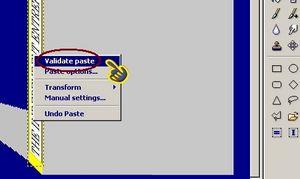
Use your mouse to move the title in place. Once you are satisfied with its position, right click on the title and select VALIDATE.
 If you’re creating a book cover, you’ll want to skip this step and go directly the Front Cover section.
If you’re creating a box, you’ll need a box top. Using Paint, create your box top (in our example, we’ll use the title). Follow the procedure to create a title but do not rotate or skew it.
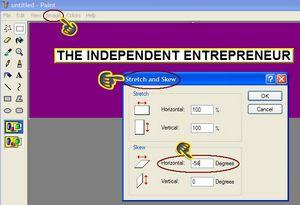
We will crop the title but in a different direction. You’ll see that the top is slanted in towards the left, we will need to do the same to the title. Click on IMAGE, STRECH AND SKEW but this time we will use the HORIZONTAL setting. Set it to – 45 (that’s minus 45).