

3-D Covers for E-Books and Boxes by An Unknown Talents Production - HTML preview
PLEASE NOTE: This is an HTML preview only and some elements such as links or page numbers may be incorrect.
Download the book in PDF, ePub, Kindle for a complete version.
Download the book in PDF, ePub, Kindle for a complete version.
21
The easiest way is to move your cursor to the page section on the book photo (your cursor will change to a dropper) and clicking on the red part.
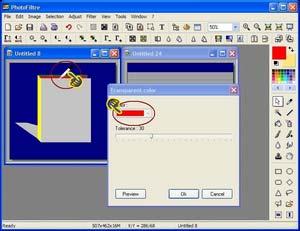 Hit the OK button to change the Red to Transparent. Right click on the photo and choose “copy” from the pop up menu.
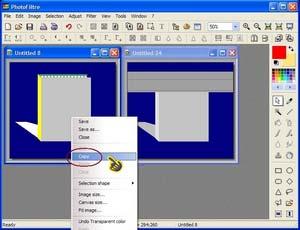
Move to the photo with the page lines, right click on it and choose “past”. You will be left with a clean book icon with page lines perfectly cut in.