

Using Cubase vst/32 with DSP Factory by Steinberg - HTML preview
PLEASE NOTE: This is an HTML preview only and some elements such as links or page numbers may be incorrect.
Download the book in PDF, ePub, Kindle for a complete version.
Download the book in PDF, ePub, Kindle for a complete version.
The Channel Overview
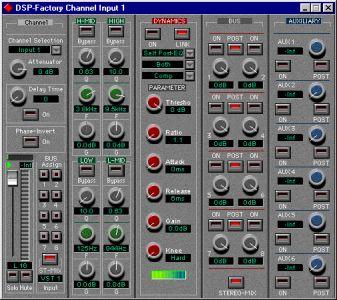
This window allows you to view and access all controls at the same time for a single channel. You select which channel to view by using the Channel Selection pop-up menu in the upper left corner.
The controls in the Channel Overview are the same as in the Input Console window, with the addition of the following parameters:Attenuator Delay Time
Phase-Invert Allows you to adjust the input signal gain, with a range of -96 to +12 dB.
Allows you to delay a channel by up to 2600 samples. The Delay On button turns the channel delay on or off.Inverts the phase of the signal.