

Cubase vst-the MIDI Mixer and Mix Tracks by - HTML preview
Download the book in PDF, ePub, Kindle for a complete version.
Editing Mixes
Arrangement Editing
Once Mixer data has been recorded into a Part, that Part can be handled like any other. Which means that you can cut, copy, split, merge, duplicate, move or whatever you need to do, to apply that certain “scene” to any part of your Song.
Detailed Editing
The Events recorded from the MIDI Mixer window are actually not MIDI Events. They are “special" Cubase VST Events. When these special Events are played back through the MIDI Mixer Objects, MIDI Events are created and sent out to your equipment.
Editing in the Controller Editor
All Special Events can be edited in the Controller Editor. Double clicking an Object with the Edit Tool opens the Controller Editor. If you select several Objects, all of these special Events will be “stacked” in the Controller Editor window:
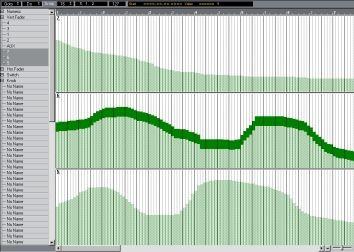 Several events in the Controller Editor.
Editing in the List Editor
The Special Events can be edited from List Edit. You have to close the Mixer window before you can select the List Editor.
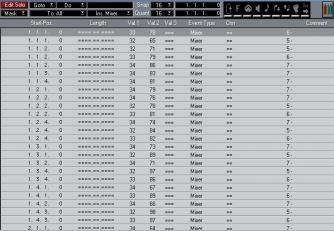
This column shows the Object’s value.
This column shows the name of the Object that produced the Event.