

Cubase vst-Modules by - HTML preview
Download the book in PDF, ePub, Kindle for a complete version.
Patch Manager Functions
The Patch Manager's menus are described in the previous chapter, but below follows a description of two items on the pop-up Functions menu which are directly related to opening it from the Arrange window.
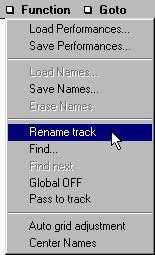
Rename Track/Part
This allows you to give the Active Track or selected Part (depending on if only a Track is selected or if a Part is) the name of the currently selected Patch. By using the Goto menu or the arrow keys (see above) you can rename all Tracks/Parts in this way, from within the Patch Manager.
If you take the time to rename all Tracks/Parts with the Patch they are playing, you can set Part appearance to Show Names, and the Arrange window will display the names of all Patches in your song.
Pass Data to Track
If the device you are editing is of the type where you can hold down [Ctrl] and click to send out settings (see page 116), there is a special function for inserting System Exclusive data for a Patch into the Arrange window.
Pass Data To Track automatically creates a Part on the Active Track, at the Song Position that contains the System Exclusive settings for the selected Patch. This feature can for example be used if you want to save the Song as a MIDI File. If you inject the Patch settings as System Exclusive in the Arrangement, this information will be included into the MIDI File, and the file can be used to program a device with your Patches, even if you play it back from another sequencer or computer.
P This function can only be used when Cubase is stopped.