

Cubase vst-Modules by - HTML preview
Download the book in PDF, ePub, Kindle for a complete version.
Saving and Updating Data
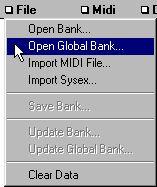
If you have downloaded some settings from a device, you can save them to disk by using the File menu. You can also Update a dump, which means to replace some of its contents with new data.
Select the Data Types to be saved, by activating them in the list. Save or Update from the File menu (the different options are described below). A standard File Selector appears where you specify name and location as usual.
Save...This saves the file in regular Studio Module format. The file extension depends on the device and on your Setup settings (see page 81). Saving over a file with the same name deletes the existing file or allows you to create a backup, see page 144.
Update Device FileIf you have already saved a file to disk (in Studio Format) you can replace some or all of the data in it. For example, a Korg M1 file can contain Programs, Combinations and Global data. If you have saved all these Data Types in a file, you can replace the Programs only, or the Global data only, by turning on only Program in the Data Type List and use the first of the two Update options on the file pop-up.
Update Global FileThe second Update option on the pop-up File menu is identical to the first, except it allows you to replace (not add!) one or more Data Type dumps in a Global (".MEM") file. Everything else is as described above.
P During any type of Save or Update, do not forget to first activate all the Data Types you want included in the file!See page 143 for more details on File Handling.