

Cubase vst-Modules by - HTML preview
Download the book in PDF, ePub, Kindle for a complete version.
Working with Banks
If the Patches in a device are divided into Banks, there will be a number of Bank buttons, just above the grid. You can click on these buttons to view the Patches in the Bank.
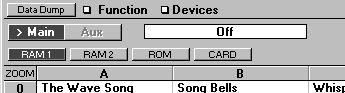
If there is a ROM bank of Patches – Patches that can't be altered by the user – the driver will still (often) contain the names for it, so you can select Patches from this ROM Bank anyway. Sometimes these names can be edited.
If there is one or more CARD banks (for Patches on memory cards) these will always be empty (most often it is impossible for the Studio Module to extract data on a card via MIDI). But the Studio Module has a special procedure for getting the names out of the cards automatically anyway, see page 121.
Some devices do not allow selection of Patches on a Card directly via MIDI. In these cases no Card Banks will appear in the Patch Manager or you won’t be able to select Patches from the Card bank, only view them.
P Similar models of the same make may differ in what Patches are in the ROM banks. Please make sure you select the correct driver. For example, if you have a Yamaha TG-77 (a rack mounted synthesizer) do not use the SY-77 (keyboard synthesizer) driver, even though the two are identical in most aspects.