

Cubase vst-Modules by - HTML preview
Download the book in PDF, ePub, Kindle for a complete version.
Viewing different Devices/Data Types
From the Modules menuIf you open the Patch Manager from the Modules menu, you use the Devices popup menu to view different devices. This lists all devices. If you select one that has several Data Types, a new menu will appear listing those. Select one.
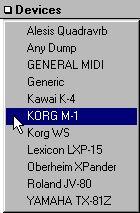

P Please observe that the display may show the device you are interested in, but not the data type you are looking for. For example, in a Korg M1 you might see the names of all Combis instead of all Programs. To change this, use the Device menu to select the same device as you already have, but in the second menu that appears, select the Data type you are interested in.
If you select a device for which there is no Patch window (such as the ANY_DUMP driver), you get the Data Dump window instead.From the Arrange window
If you open the Patch Manager from the Arrange window, you will already have assigned a device and Data Type to the Track, and the window is then automatically set to display just that.