

Cubase vst-Modules by - HTML preview
Download the book in PDF, ePub, Kindle for a complete version.
Someone else's Song on your Rig
Using "Remap Song"
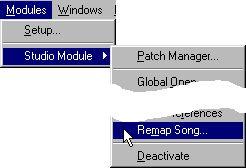
This function (which is found at the bottom of the menu that appears when you select "Studio Module" from the Modules menu) automatically changes the Song to fit as many of your devices as possible:
1. Make sure you get a copy of the Song file, the MEM file with the dumps for it, and a "STUDIO.INF" file from the person that created the song.2. Load the Song, or perhaps a backup of it.
3. Select "Remap Song...".
The Studio Module now analyses the Song and the "INF" file and compares it with your Setup. If it finds that a Track is set to play a device that you have, it will change its Instrument setting to match your rig. If it doesn't find a matching Instrument for a Track, it will be set to play no particular Instrument, and all the Patch changes will be cleared for that Track.
5. Save the Song (under a modified name).6. Use Total Send (see page 107) to transmit all the settings needed for the Song, to your devices.
P Note that you can only call this function once for each Song, or the Instruments will be all wrong (you will be modifying a Song that is now set up for your rig, with someone else's STUDIO.INF file).
While this function does its best to make all the settings in the Song suit your setup, it can't really succeed if a device that was used for the Song does not exist in your rig. To make the deassigned Tracks play some other devices, use the Arrange window's Instrument and Patch settings.
Modifying Your Setup
If you often work with someone else's Songs, you may want to create an alternative Setup that you can use to load these Songs without converting at all. This can be done by modifying your Setup.
1. Make a safety copy of your STUDIO.DAT directory.2. When you get the Song, also bring a copy of the other person’s STUDIO.DAT directory, and use this to replace yours.
3. Modify the settings in the Setup window to suit your MIDI rig.
4. Load the Song and perform a Total Send.