

Cubase vst- Getting into the Details by - HTML preview
Download the book in PDF, ePub, Kindle for a complete version.
Selecting and the To pop-up menu
The concept of selecting Events is much the same as selecting Parts, described in the Getting Started book. You can:• Click on an Event to select it (and deselect all others).
• Hold [Shift] and click on an Event to select it, keeping any previously selected Events.
• Select several Events by enclosing them in a rectangle using the Arrow tool.
• Use the Select All item on the Edit menu to select all Events in the editor. By default, the key command for this is [Ctrl]-[A].
• Hold [Shift] and double click on an Event to select all following Events of the same pitch.
• Use the [←] and [→] keys to select the previous/next Event in the Active Part. If you hold down [Shift] and use the arrow keys, the next/previous Event will be selected, without deselecting already selected Events.
• Use the “Select” submenu on the Edit menu.The contents of this submenu varies depending on which editor you’re in. See the Online Help.
Selecting Events from different Parts
You can select Events from both an active and an inactive Part:
1. Select the Events you want in the active Part, using any method described above. 2. Hold down [Shift].
This Part now becomes active.
4. While keeping [Shift] pressed, use any method to select more Events from the now active Part.
As long as you keep [Shift] pressed, you can switch active Parts and select from as many as you like, using this method.
The To Pop-up
All the editors have a pop-up menu called “To”. This is used together with the Loop and Cycle functions to collectively choose a group of Events to be affected by your editing.
All Events, active or inactive, will be affected.All Events inside the Loop
will be affected, whether the
Loop is On or Off, and
regardless of whether the
Events come from active or
inactive Parts.
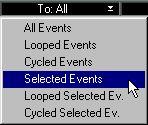
All selected Events,
inactive or active, will be affected.
Those Events that are inside the Loop and selected will be affected.
All Events inside the Cycle will be affected, whether the Cycle is On or Off, and regardless of whether the Events come from active or inactive Parts.
Those Events that are inside the Cycle and selected will be affected.