

Cubase vst- Getting into the Details by - HTML preview
PLEASE NOTE: This is an HTML preview only and some elements such as links or page numbers may be incorrect.
Download the book in PDF, ePub, Kindle for a complete version.
Download the book in PDF, ePub, Kindle for a complete version.
About editing recorded Mutes
Value 1 indicates the numberof the muted Track.
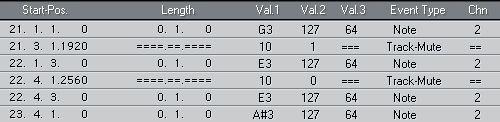
Value 2 indicates if the Event is a Mute (1) or an Un-Mute Event (0). The Mute Events that get recorded are of two types: Mute Events and Un-mute Events. When one of these Events is played back, the Track changes to the status of that Event. This means that if the Track is already muted when a mute Event is played back, nothing happens. This may sound obvious, but when you rewind or fast forward to some point, and start playback from there, this might confuse you. A Track that is “manually” muted is also un-muted by an Un-mute Event.