

Cubase vst- Getting into the Details by - HTML preview
PLEASE NOTE: This is an HTML preview only and some elements such as links or page numbers may be incorrect.
Download the book in PDF, ePub, Kindle for a complete version.
Download the book in PDF, ePub, Kindle for a complete version.
Selecting a Bank and Patch for playback in Cubase VST
After you have loaded a Bank and closed the Bank Manager dialog, you need to select a Patch in the Bank, just as you would use Program Change messages to select a sound on an external MIDI instrument:
1. Select a MIDI Track for which SoundFont is selected as Patchname Source. 2. In the Inspector, pull down the Bank pop-up menu and select the Bank you have loaded.
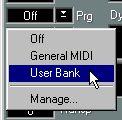 3. Pull down the Patchname pop-up menu.
A list is displayed, containing all the SoundFont names for the sounds in the selected Bank. 4. Select a Patch from the pop-up menu.
The MIDI Track will now play back the sound of the selected SoundFont Patch.