

Cubase vst- Getting into the Details by - HTML preview
PLEASE NOTE: This is an HTML preview only and some elements such as links or page numbers may be incorrect.
Download the book in PDF, ePub, Kindle for a complete version.
Download the book in PDF, ePub, Kindle for a complete version.
Entering Volume as a Play Parameter
Just as with Program Change messages you can enter MIDI Volume messages in the Inspector for individual Parts or in the Track Columns for Tracks, for example to get a basic mix at the beginning and to introduce volume changes at different positions in the Song.
When Cubase VST plays back this Part, the instrument will receive a MIDI Volume message to set its Volume to a value of 115.
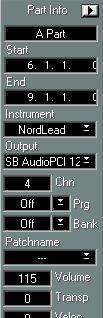
• If you enter a Volume Change for the Track, this Volume Change will be sent out at the beginning of the first Part only.
This is to avoid having a lot of MIDI data sent out at the beginning of each Part.