

Cubase vst- Getting into the Details by - HTML preview
PLEASE NOTE: This is an HTML preview only and some elements such as links or page numbers may be incorrect.
Download the book in PDF, ePub, Kindle for a complete version.
Download the book in PDF, ePub, Kindle for a complete version.
Creating a Window Set
1. Set up the window or windows as you want them.
This may include activating, resizing and positioning windows, as well as making settings (see the application examples later in this chapter).
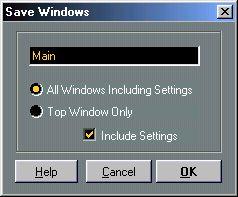 3. In the dialog that appears, type in a name and fill out the options as desired:
Option
All Windows Including Settings
Top Window Only Include Settings
Description
This stores the “state” (open/closed, position etc.) of all windows, including settings for each one as listed in the table on page 655.
This stores the state of the currently active window only. If this option is activated, the settings (if any, see page 655) for the currently active window are included.