

Cubase vst- Getting into the Details by - HTML preview
PLEASE NOTE: This is an HTML preview only and some elements such as links or page numbers may be incorrect.
Download the book in PDF, ePub, Kindle for a complete version.
Download the book in PDF, ePub, Kindle for a complete version.
Using the “Repeat” function
This function lets you repeat one or several Parts, on the same or different Tracks:
1. Select the Part(s) you want to repeat.
...or use a key command (by default [Ctrl]-[K]).
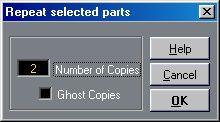 3. Enter the desired number of copies in the dialog box that appears.
Here you can also decide if the copies are to be Real Parts or Ghost Parts.
4. Click “OK”.
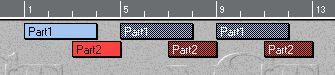
The selected Part(s) are repeated, and the copies are lined up “end-to-start” after the original(s). The Parts selected are treated as one block, so the relative spacing between the created Parts is determined by the beginning of the first selected Part and the end of the last.
 You can also repeat Parts using the Pencil tool and the [Alt] key, see page 61.