

Cubase vst- Getting into the Details by - HTML preview
Download the book in PDF, ePub, Kindle for a complete version.
Sync Options
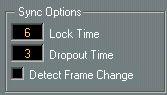
Lock Time
Using this field you can set how many frames of “correct” time code Cubase VST should receive before attempting “lock” (synchronize) to incoming time code. If you have a tape recorder with a very short start-up time, you could try lowering this number to make lock-up even faster than it already is. If you have Chase Events turned on, and many Events to chase, you could try raising this number.
Dropout Time
On a tape with time code (SMPTE) dropouts may occur. If a drop-out is very long, Cubase VST may (temporarily) stop. In the Dropout Time field you can set how long a drop-out (in frames) should be tolerated until Cubase VST decides that the tape isn't good enough to synchronize to. If you have a very stable time code source, you may lower this number to make Cubase VST stop more swiftly after the tape recorder has been stopped.