

Cubase vst- Getting into the Details by - HTML preview
PLEASE NOTE: This is an HTML preview only and some elements such as links or page numbers may be incorrect.
Download the book in PDF, ePub, Kindle for a complete version.
Download the book in PDF, ePub, Kindle for a complete version.
The Synchronization Dialog Box
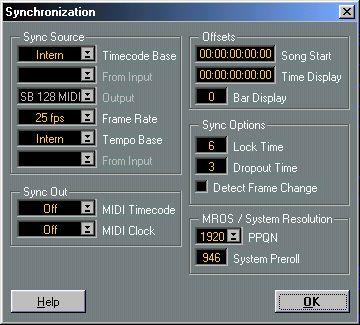
This dialog box is used for setting up everything that has to do with Cubase VST’s synchronization to other units. You reach it from the Options menu, or by double clicking the Sync button on the Transport Bar.
Once you have the settings in the dialog box right, you activate sync as such by clicking on the Sync button on the Transport bar or by pressing [X] on the computer keyboard. When the Sync button is activated, Cubase VST will automatically start when it receives a proper synchronization signal.