

Cubase vst- Getting into the Details by - HTML preview
PLEASE NOTE: This is an HTML preview only and some elements such as links or page numbers may be incorrect.
Download the book in PDF, ePub, Kindle for a complete version.
Download the book in PDF, ePub, Kindle for a complete version.
Time Locking a Track
1. As a first step, we recommend you to duplicate the entire Track.This allows you to go back to the original meter based positions later.
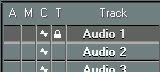
2. Click in the “T” column of the Track.
A lock symbol appears, indicating that the Track is Time Locked.
 3. Click on the Master Button on the Transport Bar, to make the settings in the Master Track govern the tempo.
P The Master Track must be activated for the Time Locking to have any effect on your recordings. For information about the Master Track, see the chapter “The Master Track”.