

Cubase vst- Getting into the Details by - HTML preview
PLEASE NOTE: This is an HTML preview only and some elements such as links or page numbers may be incorrect.
Download the book in PDF, ePub, Kindle for a complete version.
Download the book in PDF, ePub, Kindle for a complete version.
Playing back Hitpoints via MIDI
To set up MIDI playback of Hitpoints, select “Hitpoint Click...” from the Do pop-up menu in the Graphic Mastertrack editor. If you are familiar with the Metronome dialog, this one will be self explanatory.
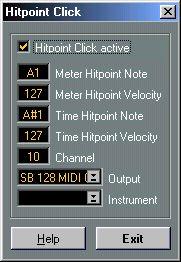
The Meter and Time Hitpoints can be set to play one key each with a certain velocity. Both share a MIDI Channel and Output setting, (which can be defined as an Instrument).