

Cubase vst- Getting into the Details by - HTML preview
PLEASE NOTE: This is an HTML preview only and some elements such as links or page numbers may be incorrect.
Download the book in PDF, ePub, Kindle for a complete version.
Download the book in PDF, ePub, Kindle for a complete version.
Merging Parts
Merging one Part with another adds all Events in the first Part to the second. It is done like this:1. Hold down [Ctrl] and [Alt] on the computer keyboard.
2. Drag the first Part and release it on top of the other Part.
The result of this depends on the Snap Setting and the Record Mode:
• Replace Mode will make the inserted Events replace the old Events in the destination Part.
Regardless of Record Mode, the destination Part will keep all its Parameters (Output, MIDI Channel and so on).
Appearance and size of the merged Part
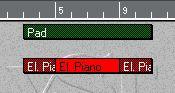
The start and end points of the two Parts don't have to match at all:
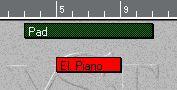
...new Parts are created, following the same rules as when creating Parts in other ways.
If the two Parts don’t exactly overlap...
 P
You can only merge two Parts which belong to the same Track class. Group Parts cannot be merged.
P
You can only merge two Parts which belong to the same Track class. Group Parts cannot be merged.