

Cubase vst- Getting into the Details by - HTML preview
PLEASE NOTE: This is an HTML preview only and some elements such as links or page numbers may be incorrect.
Download the book in PDF, ePub, Kindle for a complete version.
Download the book in PDF, ePub, Kindle for a complete version.
Activating ReWire Channels
ReWire supports streaming of up to 64 separate audio channels. The exact number of available ReWire channels depends on the synthesizer application. Using the ReWire panel in Cubase VST, you can specify which of the available channels you want to use:
1. Pull down the Panels menu and select ReWire.
The ReWire panel appears. This consists of a number of rows, one for each available ReWire channel.
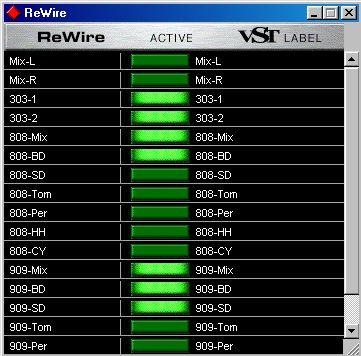 The ReWire panel for ReBirth RB-338.
2. Click on the green buttons in the “Active” column to activate/deactivate the desired channels.
The buttons light up to indicate activated channels. Please note that the more ReWire channels you activate, the more processing power is required.
3. If desired, double click on the labels in the right column, and type in another name. If you do, this label will be used in VST to identify the ReWire channel.