

Cubase vst- Getting into the Details by - HTML preview
Download the book in PDF, ePub, Kindle for a complete version.
Installing and using external effect plug-ins About this chapter
• VST-native Plug-ins.
These are effect plug-ins in VST’s “own” format, and can be used with all VST-compatible programs such as Steinberg’s Cubase VST and WaveLab.
• DirectX Plug-ins.
Microsoft DirectX is a set of standards and routines for handling various kinds of multimedia under Windows and Windows NT. DirectX plug-ins can be used with many different programs and applications, including Cubase VST.
About the “Plug-ins receive key commands” Preference
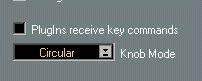
In the Preferences-General-General dialog on the Edit menu, you will find a checkbox called “Plug-ins receive key commands”. If this checkbox is activated and a plug-in window is the active window, most key commands you use will be directed to the plug-in instead of to Cubase.
For example, some plug-ins may require that you enter numerical values. Normally, the numerical keys would serve as transport control shortcuts in Cubase, but with this checkbox activated (and the plug-in window active) the key commands are directed to the plug-in instead.
P Some computer keystrokes will not be re-directed to the plug-ins, regardless of the “Plug-ins receive key commands” setting. These are: Numeric Enter, Numeric 0, Numeric 1, Numeric 2, Page Up and Page Down.