

Cubase vst- Getting into the Details by - HTML preview
PLEASE NOTE: This is an HTML preview only and some elements such as links or page numbers may be incorrect.
Download the book in PDF, ePub, Kindle for a complete version.
Download the book in PDF, ePub, Kindle for a complete version.
Setting which Wave Editor to use
To select which program to use for Wave editor, proceed like this:1. Select “Audio” from the Functions menu and then select “External Wave Editor” from the sub-menu that appears.
A dialog opens.
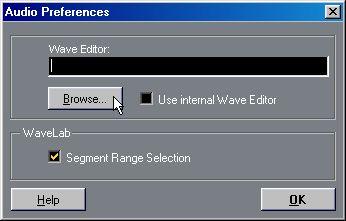 2. Make sure “Use internal Wave Editor” is unchecked.
3. Click on the Browse button.
A regular file dialog opens. Find and select the Wave editor file you want to use, and click OK. The path and name of the selected Wave editor file is displayed in the dialog, together with its program icon.
4. If you are using WaveLab Lite or WaveLab, and want to make use of the segment start and end insets when editing the audio file, activate “Segment Range Selection”. See below.
5. Click OK. Once you have selected a Wave editor using the procedure described on the previous pages, you can access it from inside the Pool or the Audio Editor.