

Cubase vst- Getting into the Details by - HTML preview
PLEASE NOTE: This is an HTML preview only and some elements such as links or page numbers may be incorrect.
Download the book in PDF, ePub, Kindle for a complete version.
Download the book in PDF, ePub, Kindle for a complete version.
Thru Filters
There might be situations where you want to have MIDI Thru active (see the Getting Started book), but still don’t want one certain type of MIDI message to be sent “Thru” Cubase VST.
For example, System Exclusive that you send out from a MIDI Instrument to record into Cubase VST, should most probably not be immediately sent back to the instrument, since this might lead to serious confusion.
1. Open the MIDI Filter dialog.2. In the “Thru” section, activate the check boxes for the MIDI data types you don’t want to record.
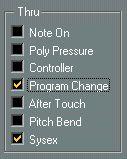 In this example System Exclusive and Program Change will not be Thru-put.