

Cubase vst- Getting into the Details by - HTML preview
PLEASE NOTE: This is an HTML preview only and some elements such as links or page numbers may be incorrect.
Download the book in PDF, ePub, Kindle for a complete version.
Download the book in PDF, ePub, Kindle for a complete version.
Closing the Editor
The following options apply when you close the Controller Editor:
• To close the Editor and discard all changes made, use the [Escape] key.
The “Keep Appended events” Dialog
If you close the editor and a dialog appears asking you if you want to “keep appended events”, this is because you have added Events outside the Part(s) being edited.
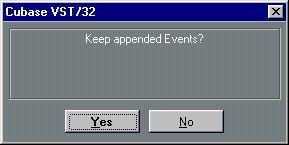 Click “Yes” to lengthen the Part and encompass the added Events, click “No” to discard the Events.