

Cubase vst- Getting into the Details by - HTML preview
PLEASE NOTE: This is an HTML preview only and some elements such as links or page numbers may be incorrect.
Download the book in PDF, ePub, Kindle for a complete version.
Download the book in PDF, ePub, Kindle for a complete version.
Opening the Controller Editor
P Only Parts on one Track at a time can be open in the Controller Editor.Opening for a MIDI Track
To open the Controller Editor for a MIDI or Drum Track, proceed as follows:
1. Select a Track (or Part).
The Controller Editor window appears.
Opening for a MIDI or Audio Mix Track
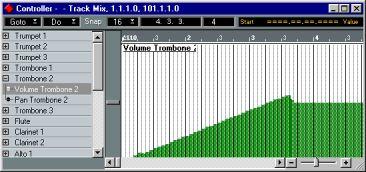
To open the Controller Editor for a MIDI or Audio Mix Track, there are two options:
1. Select a MIDI or Audio Mix Track.
2. Select Controller from the Edit menu.
• Double click a MIDI or Audio Mix Track in the Arrange window.
The Controller Editor window appears.
Opening from a MIDI Mixer Map
It is also possible to open the Controller Editor from a MIDI Mixer Map. The MIDI Mixer is explained in a separate document. To Open the Controller Editor from a MIDI Mixer Map, proceed as follows:
1. Select the Arrow Tool in the MIDI Mixer.2. Double click any Object in the MIDI Mixer Map.
The Controller Editor opens.