

Cubase vst- Getting into the Details by - HTML preview
PLEASE NOTE: This is an HTML preview only and some elements such as links or page numbers may be incorrect.
Download the book in PDF, ePub, Kindle for a complete version.
Download the book in PDF, ePub, Kindle for a complete version.
Creating Events
1. Use the Insert pop-up menu to decide what type of Event to Insert.
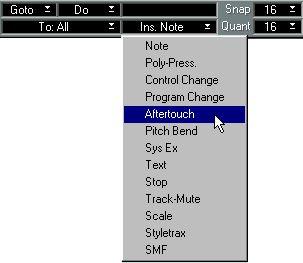
2. Set the Snap value to the smallest position you want to enter a note at.
3. If you are entering notes, set their length with the Quantize value.
From here there are three ways to go:
• Activate Step Input by clicking on the foot symbol on the Status Bar. Step programming is described in “Step Recording”.
• Create notes using the Do menu, see page 174.
If you are inputting notes, they will have...
• the pitch C3.
• a Note On velocity of 127 (unless you have pressed modifier keys while inputting the note (see page 182).
• a Note-Off velocity of 64.
• the MIDI Channel value of the Part.