

Cubase VST-Score Printing and Layout by - HTML preview
PLEASE NOTE: This is an HTML preview only and some elements such as links or page numbers may be incorrect.
Download the book in PDF, ePub, Kindle for a complete version.
Download the book in PDF, ePub, Kindle for a complete version.
Selecting all Notes in a Voice
There are two ways to select notes in one voice only:By using the Edit menu
1. Pull down the Edit menu and display the Select submenu. 2. Display the Voice graphical submenu and select one of the voices. Voices that are not activated are “greyed out” on the submenu.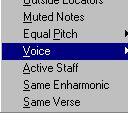
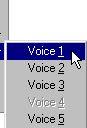

 All notes in the indicated voice are selected.
 By double clicking
1. Hold down [Shift].Voice 1,2,3,5 and 6 are activated and Voice 1 is selected.
Voice 4, 7 and 8 are not activated and are therefore “greyed out”.
2. Double click on one of the notes in the voice you want to select.
The note and all following notes in the voice are selected. This means that if you want to select all notes in a voice with this method, you have to click on the first note in the voice.