

Cubase VST-Score Printing and Layout by - HTML preview
PLEASE NOTE: This is an HTML preview only and some elements such as links or page numbers may be incorrect.
Download the book in PDF, ePub, Kindle for a complete version.
Download the book in PDF, ePub, Kindle for a complete version.
Adding Rests
You can add rests to the score. This is done as with notes, but with one major difference. Rests are always “inserted” into the score, that is, they “push” the notes that come after, to the right.
1. Select the rest value by selecting a Note value.This is described in detail above.
2. Select a Snap value.
Also described above. The Snap will determine where you are able to insert the rest, as with notes.
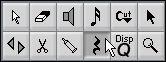
The Rest Tool in the Toolbox.
4. Position the mouse pointer over the note lines.
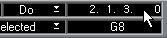
Use the position box if you are unsure about the correct position.
 6. Click with the mouse button.
The position is shown here.
The rest appears in the score and all the notes after it on the staff are moved “to the right”. Before and after an eighth note rest was inserted at the beginning of the bar.