

Cubase VST-Score Printing and Layout by - HTML preview
PLEASE NOTE: This is an HTML preview only and some elements such as links or page numbers may be incorrect.
Download the book in PDF, ePub, Kindle for a complete version.
Download the book in PDF, ePub, Kindle for a complete version.
Changing Magnification
There are two general ways to change the magnification in Page Mode: by setting a magnification factor on the Scale pop-up menu or by using the Magnifying Glass tool.
Using the Scale Pop-up Menu
To the left of the Page Number Indicator you will find a pop-up allowing you to set the magnification factor.
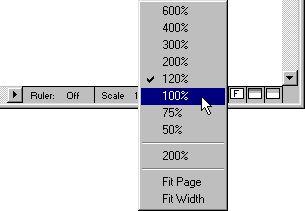 The magnification pop-up.
By zooming in you will be able to make detailed adjustments to symbols etc. By zooming out you will get a better overview.
• You can double click and type in a custom magnification factor.
This custom magnification factor will remain on the pop-up menu until you specify a new one.
• If you select “Fit Width”, the magnification factor will be adjusted according to the window width, so that the full width of the page is visible.
Using the Magnifying Glass tool
The Magnifying Glass tool in Score Edit works much like in the Arrangement:
• Click once with the Magnifying Glass to zoom in one step.
• Hold down [Ctrl] and click once with the Magnifying Glass to zoom out one step. When you press [Ctrl], the Magnifying Glass is shown with a minus sign, to indicate that it will decrease magnification.
• Drag a rectangle with the Magnifying Glass to set a custom magnification. The section encompassed by the rectangle is magnified to fill the window.