

Cubase VST-Score Printing and Layout by - HTML preview
PLEASE NOTE: This is an HTML preview only and some elements such as links or page numbers may be incorrect.
Download the book in PDF, ePub, Kindle for a complete version.
Download the book in PDF, ePub, Kindle for a complete version.
Crescendo to Velocity
P This function makes permanent changes to your notes!
1. Double click on the crescendo or diminuendo symbol.
The Process Crescendo dialog appears.
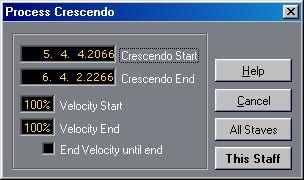 2. If the Crescendo Start and End positions are not exactly what you want, adjust them in the dialog.
3. Use the Velocity Start value to set up the amount of velocity change you want to apply to the note(s) at the absolute beginning of the crescendo.
The value is defined as a percentage of original velocity.
5. If you want the velocity change specified at the end of the crescendo to be performed on all following notes in the score, activate “End Velocity until End”. 6. Decide if you want the change to affect the current staff only, or all staves, by clicking the appropriate button. This function allows you to make a dynamic symbol affect the actual velocity of a range of notes. Proceed as follows: