

Cubase VST-Score Printing and Layout by - HTML preview
PLEASE NOTE: This is an HTML preview only and some elements such as links or page numbers may be incorrect.
Download the book in PDF, ePub, Kindle for a complete version.
Download the book in PDF, ePub, Kindle for a complete version.
Note Head Shape
If all you want is a fret number for your notes, you can use the Note Info dialog on regular notes.1. Double click on the head of a note.
The Note Info dialog appears.
2. Activate the Tablature option and set a fret number in the value field just beside this.
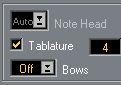
 The Tablature settings in Note Info.
3. Click Apply and close the dialog.