

Cubase VST-Score Printing and Layout by - HTML preview
PLEASE NOTE: This is an HTML preview only and some elements such as links or page numbers may be incorrect.
Download the book in PDF, ePub, Kindle for a complete version.
Download the book in PDF, ePub, Kindle for a complete version.
Adding Brackets and Braces
While it’s possible to add Brackets and Braces (curly brackets) manually from the Layout Palette, you can also do this in the Layout Settings dialog: 1. Open the Layout Settings dialog.In the Track list, you will find columns for “Braces” ( { ) and “Brackets “ ( [ ).
2. Click in one of the columns and drag downwards in the list to encompass the desired Tracks.
The column indicates graphically which Tracks will be encompassed by the brace/bracket.
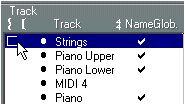 Click at the first Track for which you want a Bracket or Brace...
3. Close the Layout Settings dialog.
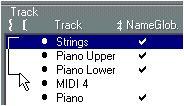 ..and drag downwards in the list
 to enclose the desired Tracks.
The score is displayed with brackets or braces according to the settings you made.
• You can edit brackets and braces in the dialog by dragging the ends of the indicator in the list.
• To remove a bracket or brace, hold down [Ctrl] and click on its indicator in the list, at the topmost Track.
P If the option “Show Braces in Edit mode” is activated in the Preferences-Score-Editor Behaviour dialog, brackets and braces are shown in Edit mode as well.