Viral Internet Marketing Made Easy - How To Make Money Online By List Buildin by Mike Maquilan - HTML preview
PLEASE NOTE: This is an HTML preview only and some elements such as links or page numbers may be incorrect.
Download the book in PDF, ePub, Kindle for a complete version.
Download the book in PDF, ePub, Kindle for a complete version.

Step 1. Login To Your Newly Imported WordPress Site
After successfully importing your funnel, you need to login to the admin of your newly imported WordPress site using the credentials below:
- username: admin
- password: password
You should change this later by going to Users > Your Profile.
Step 2. Set Your Permalinks Structure to Post Name
Go to Settings > Permalinks and change permalinks structure to post name.

Step 3. Edit Your Viral Funnel In Social Funnels
Click the Social Funnels menu on the bottom left side of your WordPress admin. And Select the ‘Make Money Online’ campaign.
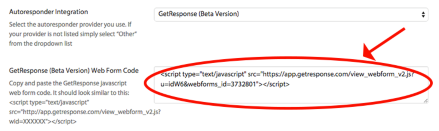
Step 4. Paste Your Web Form Code To Social Funnels
Go to General Settings, and paste your Web Form Code on the field provided.