

Excel VBA formulas for Spreadsheet by Sharath Kumar Peechara - HTML preview
PLEASE NOTE: This is an HTML preview only and some elements such as links or page numbers may be incorrect.
Download the book in PDF, ePub, Kindle for a complete version.
Download the book in PDF, ePub, Kindle for a complete version.
Exercise 20: View the Formula of cell in another Cell
1. Create a UDF Formuladisplay (User Defined Function)
To create this Function, execute the following steps
- Open Excel VBA (Alt + F11)
- Insert a New Module
- In the Project Explorer, double click on the Module
- Add the following code line:
Insert the below code in a New Module

This Code lines will create function Formuladisplay () , In Cell D1 Type
= Hedqtrs( (C1)
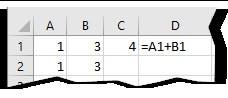
Syntax FORMULATEXT(reference)
2. Use Excel Formulas (FORMULATEXT)
=FORMULATEXT(C1)