

Excel VBA formulas for Spreadsheet by Sharath Kumar Peechara - HTML preview
PLEASE NOTE: This is an HTML preview only and some elements such as links or page numbers may be incorrect.
Download the book in PDF, ePub, Kindle for a complete version.
Download the book in PDF, ePub, Kindle for a complete version.
Exercise 16: Convert VBA Function to Excel Function
- Create a UDF (User Defined Function)
- Use Defined Name
To create this Function, execute the following steps
- Open Excel VBA (Alt + F11)
- Insert a New Module
- In the Project Explorer, double click on the Module
- Add the following code line:
Use the FIX Function of Excel VBA code lines function to use it in Excel sheet ,Insert the below code in a New Module.
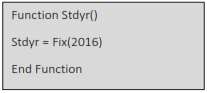
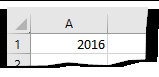
This Will Create A new UDF (User Defined Function) with name Stdyr() we Can use this As we Required. type in Excel the function As = Stdyr(), the UDF Comes up in the year as 2016 which is constant figure
Keep the Cell Format as General In Spreadsheet
This Code lines will create function Stdyr()
In Cell A1 Type
= Stdyr(A1)
2. Defined Name
Click on Formulas  Defined Formulas Define Name
Define Name for Any cell With Value “2016 “, Type in any cell As =stdyr