

Excel VBA formulas for Spreadsheet by Sharath Kumar Peechara - HTML preview
Download the book in PDF, ePub, Kindle for a complete version.
Exercise 12: Choose Function
1. Create a UDF DayName( (User Defined Function)
To create this Function, execute the following steps
- Open Excel VBA (Alt + F11)
- Insert a New Module
- In the Project Explorer, double click on the Module
- Add the following code line:
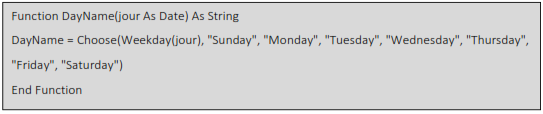
The Code Will Create A new UDF (User Defined Function) with name DayName,With this now type in Excel the function = DayName ,the UDF shows in small letter to differentiate itself from Standard Excel Formula
=DayName(11/4) returns day name in current year
=DayName(11/5/2015) returns day name in the year 2015
2. Use Excel Formulas (Choose)
Syntax
CHOOSE(index_num, value1, [value2], ...)
= CHOOSE(3,"Sunday", "Monday", "Tuesday", "Wednesday", "Thursday", "Friday", "Saturday")
Excel will perform search for 3rd And the Day Results As Tuesday
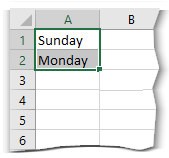
In File – Otions –Advanced – General - Enter Custom list As Sunday, Monday, Tuesday, Wednesday, Thursday, Friday, Saturday
Upon Entering A day Drag the Cell bottom for Next day to follow