

Excel VBA formulas for Spreadsheet by Sharath Kumar Peechara - HTML preview
PLEASE NOTE: This is an HTML preview only and some elements such as links or page numbers may be incorrect.
Download the book in PDF, ePub, Kindle for a complete version.
Download the book in PDF, ePub, Kindle for a complete version.
Exercise 7:Simple Multiplication
To create this Function, execute the following steps
- Open Excel VBA (Alt + F11)
- Insert a New Module
- In the Project Explorer, double click on the Module
- Add the following code line:

This Code lines will create function Multiply()
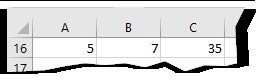
In Cell C1 Type
= Multiply(A1,B1)
2. Use Excel Formulas
=A1*B1