Access Checklist by Dennis - HTML preview
PLEASE NOTE: This is an HTML preview only and some elements such as links or page numbers may be incorrect.
Download the book in PDF, ePub, Kindle for a complete version.
Download the book in PDF, ePub, Kindle for a complete version.
YouTube
In order to get started with YouTube you must convert your account to a brand account. Only the owner of a Brand Account can grant people access to a YouTube channel.
- On YouTube, sign in as the owner of the Brand Account.
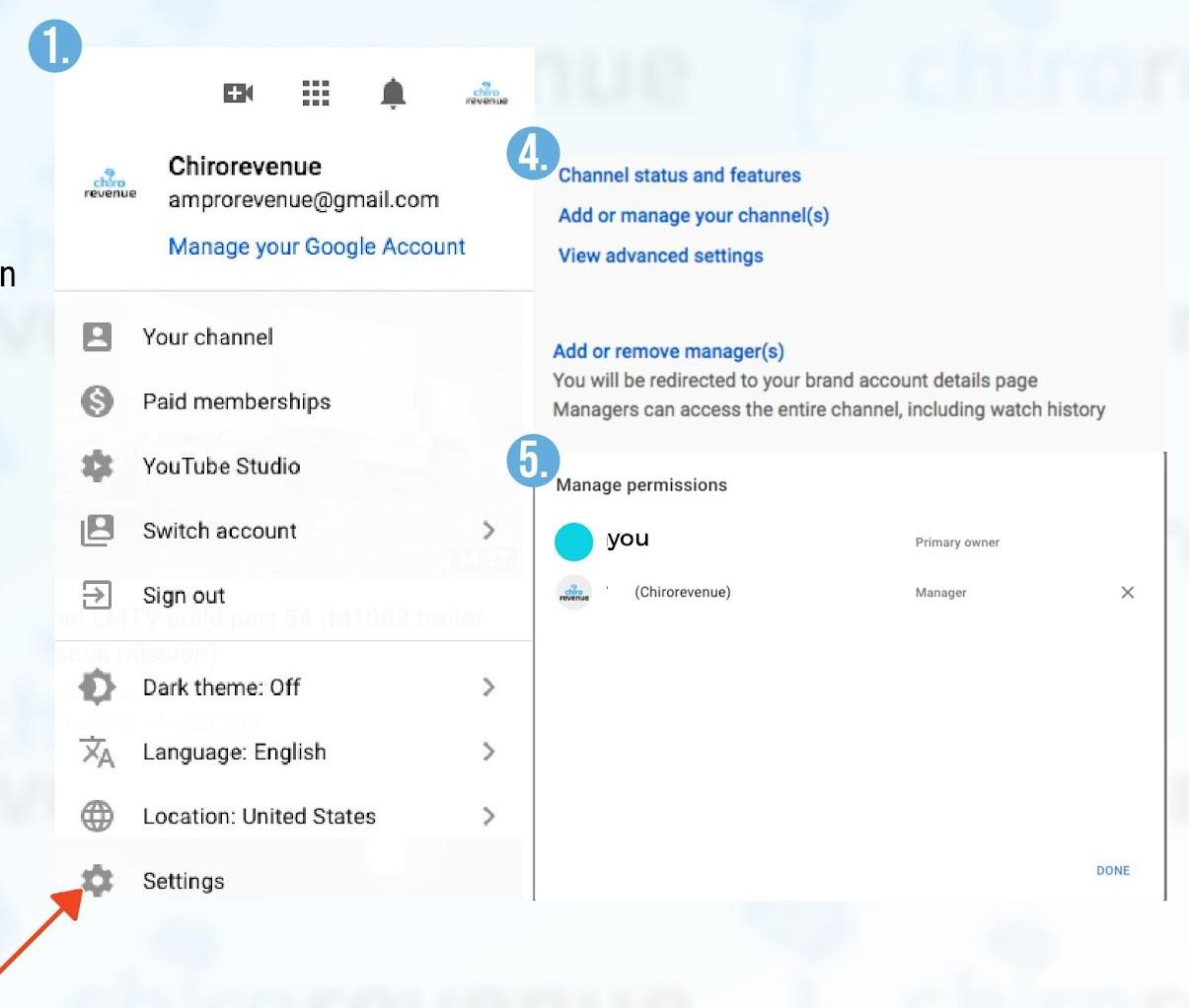
- In the top right, click the account icon and select the channel you want to manage.
- Go to the channel's Account settings by clicking the Channel icon > then Settings.
- Click Add or remove managers. You'll be redirected to the Brand Account details page.
- Click Manage permissions. You'll see a list of people who can manage the account.
- To invite new people, choose Invite new users Ask people to manage.
- Enter "access@blitzmetrics.com".
- Below the name, choose admin
- Select Invite and then Done.