

Learn 'Mobile First' Web Design Using Bootstrap 3 by Rahul A. Sakla - HTML preview
Download the book in PDF, ePub, Kindle for a complete version.
3.3 Lead Body Copy
Make a paragraph stand out by adding .lead.
Example
Vivamus sagittis lacus vel augue laoreet rutrum faucibus dolor auctor. Duis mollis, est non commodo luctus.
<p class="lead">...</p>
Inline text elements
Marked text
For highlighting a run of text due to its relevance in another context, use the <mark> tag.
Example

You can use the mark tag to <mark>highlight</mark> text.
3.4 Deleted and strikethrough text
For indicating blocks of text that have been deleted use the <del> tag. And to use strikethrough effect just insert <s> tag insted of <del> tag.
Example
This line of text is meant to be treated as deleted text.
This line of text is meant to be treated as strikethrough text.
<del>This line of text is meant to be treated as deleted text.</del> OR
<s>This line of text is meant to be treated as strikethrough text</s>
Inserted and underlined Text
For indicating additions to the document use the <ins> tag. To use underlined effect change <ins> tag with <u> tag.
Example
This line of text is meant to be treated as an addition to the document.
This line have underlined effect
<ins>This line of text is meant to be treated as an addition to the document.</ins>
<u>This lines have underlined effect</u>
3.5 Small Text
For de-emphasizing inline or blocks of text, use the <small> tag to set text at 85% the size of the parent. Heading elements receive their own font-size for nested <small> elements. You may alternatively use an inline element with .small in place of any <small>.
Example

<small>This line of text is meant to be treated as fine print.</small>
3.6 Bold Text
For emphasizing a snippet of text with a heavier font-weight, using <strong> tag
Example

<p>The snippet of text is <strong>rendered as bold text</strong></p>
Italic Text
For emphasizing a snippet of text with italics, using <em> tag
Example

<p>The snipper of text is <em>rendered as italicized text</em></p>
 Feel free to use <b> and <i> in HTML5. <b> is meant to highlight words or phrases without conveying additional importance while <i> is mostly for voice, technical terms, etc.
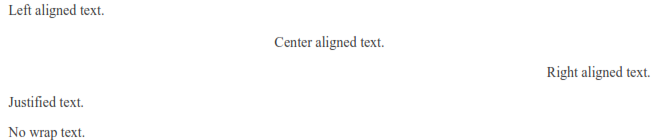
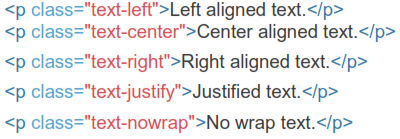
Alignment Classes
Easily realign text to components with text alignment classes.
Example
3.7 Transformation Classes
Transform
Find Your Next Great Read
Describe what you're looking for in as much detail as you'd like.
Our AI reads your request and finds the best matching books for you.
Popular searches:
Create a Free Account to Download
Join 9.7 million members — your free account takes a minute, and your first book is ready right away