

Java 3D Programming by Daniel Selman - HTML preview
Download the book in PDF, ePub, Kindle for a complete version.
Example code
A.3 Instructions for running the examples
Table A.1 lists the example code that appears throughout this book. The code itself may be downloaded from http://www.manning.com/selman.
Table A.1
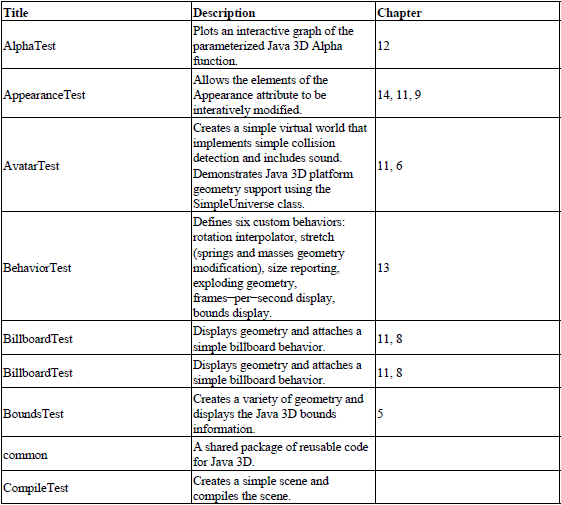
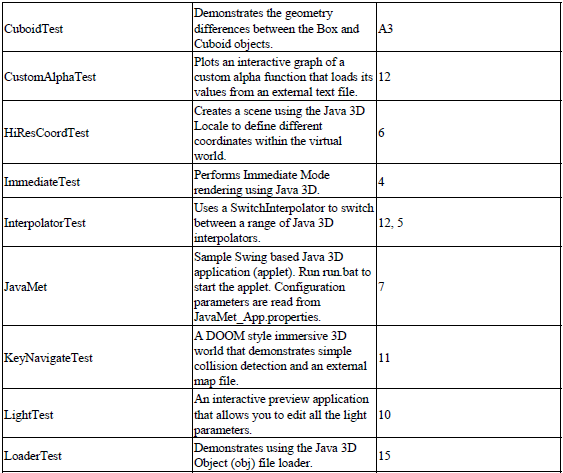
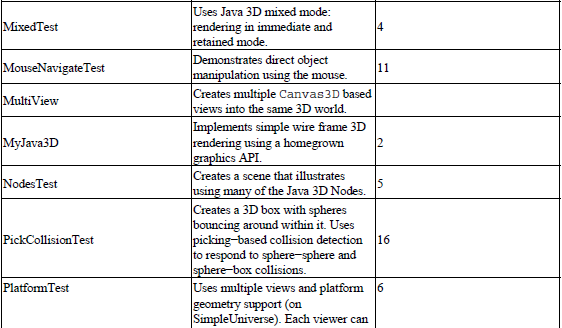
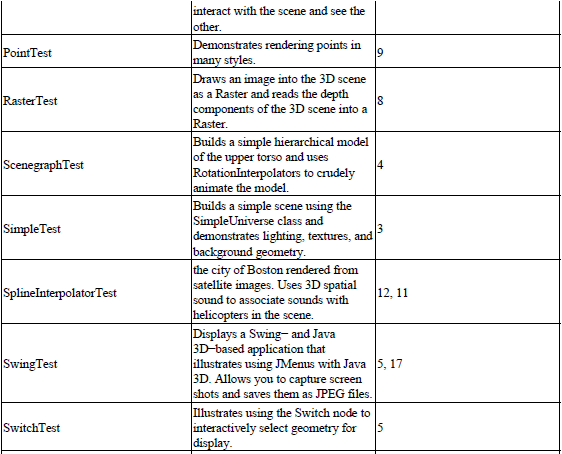
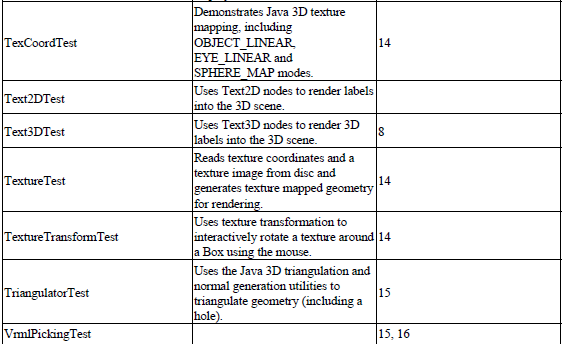

Before running any of the included examples, please complete the general Java 3D installation instructions described in chapter 3. Verify that Sun’s Java 3D demo applications run from the command line. For example:
C:\jdk1.3\demo\java3d\HelloUniverse>java HelloUniverse
should pop up a window with a rotating cube.
Next, download and unzip the examples for the book to a suitable directory.
Copy the utility JAR files:
- j3dtree.jar (open-source Java 3D scenegraph viewer, written by the author)
- vrml97.jar (Java 3D VRML loader)
to the JDK extensions directory. For example, copy them to
C:\JDK1.3\JRE\LIB\EXT
This will make the classes within the JAR files available to Java applications without referencing them in the CLASSPATH, making it easier to run the examples.
A.3 Instructions for running the examples
Set the SELMAN_CLASSPATH environment variable to the installation location:
set SELMAN_CLASSPATH=“C:\dselman\classes”
Set the location of your JDK installation:
set JAVA_HOME=c:\jdk1.3
Running the examples should now be as easy as switching to the relevant directory and typing run.bat.
Most of the examples have been formatted to run comfortably on fairly modest hardware without hardware acceleration. If you have a fast machine and hardware acceleration, you should be able to increase the size of the rendering window by simply resizing it.
In addition to the rendering window, many of the examples use J3dTree to pop up a scenegraph introspection window that will show you the structure of the Java 3D scenegraph being rendered.
A.3.1 Running applet examples
Some of the examples are available as both an application and an applet. Applets use the JDK 1.2 plug-in and include an HTML file in their example directory. If you have followed the installation instructions in chapter 2, the examples should run by just double-clicking the HTML file to open it in your Netscape or Internet Explorer web browser.
Note that the dselman.jar file containing all the class files for the book should be copied into the JRE\LIB\EXT directory.
The following examples are available in applet and application form:
- AlphaTest: Simple 2D display using Java 3D Alpha class.
- CustomAlphaTest: 2D display of a custom Alpha class with a popup Java 3D rendering Canvas.
- JavaMet: Large 2D/3D Swing application.
- VrmlPickingTest: Loads a VRML file into the browser and activates picking (mouse selection). Use the mouse buttons to rotate, translate, and scale the VRML model.