

Secrets of Microsoft Word by Jay Gilbert - HTML preview
PLEASE NOTE: This is an HTML preview only and some elements such as links or page numbers may be incorrect.
Download the book in PDF, ePub, Kindle for a complete version.
Download the book in PDF, ePub, Kindle for a complete version.
The Secrets Of Microsoft Word
Personally, I don’t use charts that much…but they may be good for sales presentations or presentations to prospective investors etc…You might put together a prospectus using a template (see chapter on templates), and add your own logo and some charts.
Then, PDF it using the sources recommended above!
I should point out that you can also import graphs from most any other type of document.
Let’s say you created a chart in excel.
What you would do is first create a text box, then copy and paste the chart into that text box.
Remember as I mentioned earlier…the text box feature
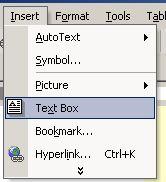 This is key to adding pictures and charts to your Word documents.
 Once they are in a text box, you can drag em around anywhere in your document or use the arrow keys to move the box around the page.
This makes for a powerful graphic design program…especially because when you print it, it will print out the way you want it to.